
If you have filed your ITR in the last couple of years, you have probably noticed something: the Income Tax Department now knows a lot more about your finances than it used to. Two documents are at the centre of this Form 26AS and the Annual Information Statement (AIS). Both are available on the e-filing portal. Both contain data the department will use to assess your return. And in many cases, they will not match each other or your own records.
That gap is exactly what creates problems at the time of filing. A mismatch between AIS, Form 26AS, and your declared income is one of the more avoidable reasons taxpayers receive notices or face demand for additional tax. The reconciliation is not complicated, but it does take a bit of deliberate attention before you file.
What Form 26AS Shows
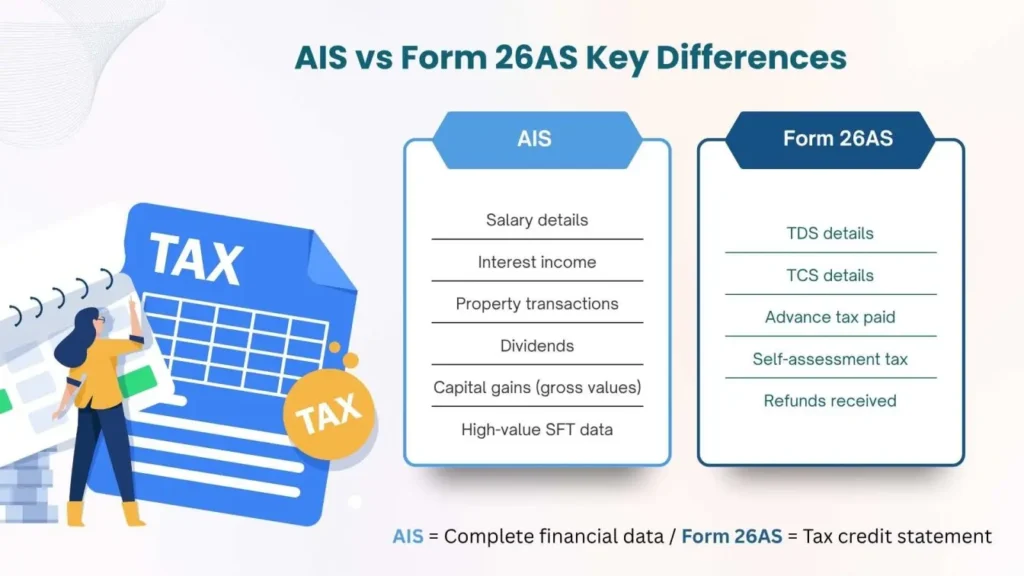
Form 26AS is the older of the two documents. Most taxpayers know it as a consolidated tax credit statement and that is broadly accurate. It reflects:
- TDS (Tax Deducted at Source) from salary, FD interest, rent, professional fees, and other income where a deductor has filed a TDS return
- TCS (Tax Collected at Source) on vehicle purchases or remittances under LRS
- Advance tax and self-assessment tax paid directly by you
- Refunds issued in previous years
The data comes from what deductors report to the department. So if your employer files a TDS return with a wrong PAN, or a bank credits FD interest to the wrong financial year, that error ends up in your Form 26AS and it may not reflect what you know to be true from your own records.
What the AIS Added and Why It Changed the Picture
The Annual Information Statement was introduced in late 2021 and has been expanded considerably since. It pulls together a much wider set of financial data, not just TDS-based information, but transactions reported by banks, depositories, registrars, GST authorities, and other entities.
AIS covers salary, interest from savings and fixed deposits, dividend income, securities transactions (buy and sell), real estate transactions sourced from registrar data, foreign remittances, GST turnover for businesses, and significant cash transactions above threshold limits.
This is what makes AIS both useful and tricky. The department is now aggregating data from multiple sources all linked to your PAN. If a transaction has been reported by a financial institution or reporting entity, it is generally reflected in your AIS, though occasional reporting mismatches or timing differences may occur.
The AIS also includes a companion document: the Taxpayer Information Summary (TIS). The TIS is a summarized version of AIS data that categorises income into different heads such as salary, interest, and capital gains. It is also used to pre-fill your Income Tax Return (ITR), meaning any discrepancy in AIS directly flows into your return unless corrected or reviewed. The TIS consolidates AIS figures by income category and is what pre-fills your return on the portal. So if AIS has an error or duplicate entry, that error flows directly into your pre-filled ITR filing.
Where the Two Documents Diverge
This is where most taxpayers run into trouble. AIS and Form 26AS frequently show different numbers for the same category. Here is why that happens:
Timing gaps. AIS may reflect transactions reported by banks or registrars before TDS returns have been processed by TRACES. Form 26AS updates only after TDS returns are filed and cleared. During the April–July filing season, this lag can run to weeks.
Different source data. Form 26AS relies almost entirely on TDS filings. AIS draws from SFT (Statement of Financial Transactions) filers, registrars, brokers, and banks. A transaction with no TDS involved, a share sale, a property purchase — may appear in AIS but not in Form 26AS at all.
Gross vs. net values. AIS often shows gross sale proceeds for securities. Your actual taxable income is the capital gain, not the sale value. If you treat the AIS figure as income from your share or mutual fund transactions, you will significantly over-report.
Duplicate entries. AIS has had a documented issue with the same transaction appearing twice, reported by both the broker and the depository, for instance. The department added a feedback mechanism for this, but the duplicates do not always get resolved before you file.
Employer data inconsistencies. AIS salary figures sometimes differ from Form 16 or Form 26AS, typically when an employer files revised TDS returns after the original was processed.
It is important to understand that neither AIS nor Form 26AS replaces the other. Form 26AS remains the official tax credit statement, while AIS acts as a comprehensive financial transaction statement. Both serve different purposes and must be reviewed together before filing your return.
Confused Between AIS & 26AS?
Reconcile your tax records accurately before filing your ITR.
How to Reconcile — Category by Category
Salary. Compare the AIS salary figure with your Form 16 (Part A and Part B) and Form 26AS. Discrepancies usually trace back to timing of TDS return filings or revised filings by the employer. Use Form 16 as your primary reference, it reflects the correct breakup of salary, allowances, and deductions.
Interest income. Banks report interest to AIS based on accrual. For TDS on FD interest, the figure in Form 26AS should match what the bank has deducted and deposited with the government. But AIS may show gross interest while Form 26AS shows only the TDS-deducted portion. Reconcile these separately using bank statements or interest certificates.
Capital gains. This takes the most attention. AIS shows gross sale consideration for shares and mutual funds not gains. Your actual capital gains depend on cost of acquisition, date of purchase, holding period, and applicable rates (STCG or LTCG). Download your transaction statements from your broker or registrar (CAMS or KFintech for mutual funds) and calculate gains independently. Do not use the AIS figure as your income. If you are unsure about this, reading up on common ITR filing mistakes before you proceed can save a lot of rework.
Dividends. Cross-check AIS dividend entries against your dividend warrants or depository account statement. Holdings in physical form or older ISINs sometimes have missing or mismatched entries.
Real estate transactions. If you sold a property, AIS will show the registered stamp duty value. This may differ from the actual sale consideration. Under Section 50C, you use whichever is higher actual consideration or stamp duty value. Make sure your ITR reflects the correct computation.
High-value and SFT-reported transactions. Cash deposits above ₹10 lakh, credit card payments exceeding ₹1 lakh per month, or foreign remittances above threshold will appear here. If you see an entry you do not recognise, trace it back before filing. Reporting errors by banks do happen, but so does a genuine transaction that slipped your memory.
Using the AIS Feedback Mechanism
For every entry in AIS, you can submit feedback, confirming it is correct, flagging it as a duplicate, marking it as belonging to another PAN, or noting an incorrect amount. The department reviews these and may update the AIS accordingly.
This matters because your pre-filled return is generated from AIS/TIS. If you accept pre-filled data without review, you may end up carrying forward inconsistencies or outdated reporting entries that need correction before filing. Always verify, then file. If you need guidance on which ITR form applies to your income profile, that is worth sorting out at the same time.
What Happens If You Skip the Reconciliation
The department will not. Returns are now increasingly cross-verified with AIS and other reported financial data during processing. If your declared income in a category is significantly lower than what AIS shows, the return gets flagged. You may receive an intimation under Section 143(1) asking you to explain the difference or, in more significant cases, a scrutiny notice.
The bigger issue is timing. Responding to a notice months after filing digging up transaction records, capital gain statements, and interest certificates is far more painful than spending the time upfront. Unexplained discrepancies can also lead to interest under Sections 234A, 234B, or 234C if tax was short-paid as a result.
A Quick Pre-Filing Checklist
Before you file, work through these steps:
- Download AIS and Form 26AS from the income tax portal for FY 2024-25
- Compare income category by category: salary, interest, dividends, capital gains, rent, other income
- For capital gains, calculate independently from broker/registrar statements, do not use AIS gross values as income
- Submit AIS feedback for any entries that are incorrect, duplicated, or misattributed
- Verify that all TDS credits in Form 26AS match your TDS certificates (Form 16, Form 16A)
- Check that TCS paid on vehicle purchases or LRS remittances appears correctly in Form 26AS
- Review pre-filled ITR figures against your own calculations before accepting them
The deadline for ITR filing is something to keep in mind as well, filing closer to the deadline leaves less time to resolve discrepancies if they surface. If your return involves multiple income sources, foreign assets, or capital gains from different asset classes, working with a professional tax consultant in India or using ITR filing services makes the reconciliation process significantly more manageable.
For a broader look at how professional support changes the filing experience, this post on why to choose a professional for ITR filing covers the key considerations.
Let Transparian Handle Your ITR Filing
From reconciling AIS and Form 26AS to filing returns with accuracy across salary, capital gains, and multiple income sources, Transparian provides reliable ITR filing services and tax consultant in India support for individuals, salaried employees, and businesses. With experienced advisors managing the details, you file on time, avoid notices, and stay fully compliant.
FAQ’s
AIS is a detailed statement showing all financial transactions reported to the Income Tax Department, while Form 26AS mainly shows TDS, TCS, and tax payments linked to your PAN.
Both are important. Form 26AS confirms your tax credits, while AIS provides a broader view of income and transactions. You must reconcile both before filing ITR.
They differ due to reporting delays, different data sources, duplicate entries, and AIS including gross transaction values instead of taxable income.
Mismatch can lead to tax notices, return processing delays, or scrutiny under Section 143(1) if income differences are not properly explained.
No, Form 26AS only shows tax credits. You still need AIS, Form 16, bank statements, and investment records to correctly report all income.
You should verify salary, interest, dividends, capital gains, and TDS credits in AIS against Form 26AS, Form 16, and bank/investment statements.